
9/1/2026 · Tutorials.app
QR codes on product packaging: best practices that actually work.
Where to place a QR code, how big it should be, what the label should say, what it should link to, and how to test it before the print run.
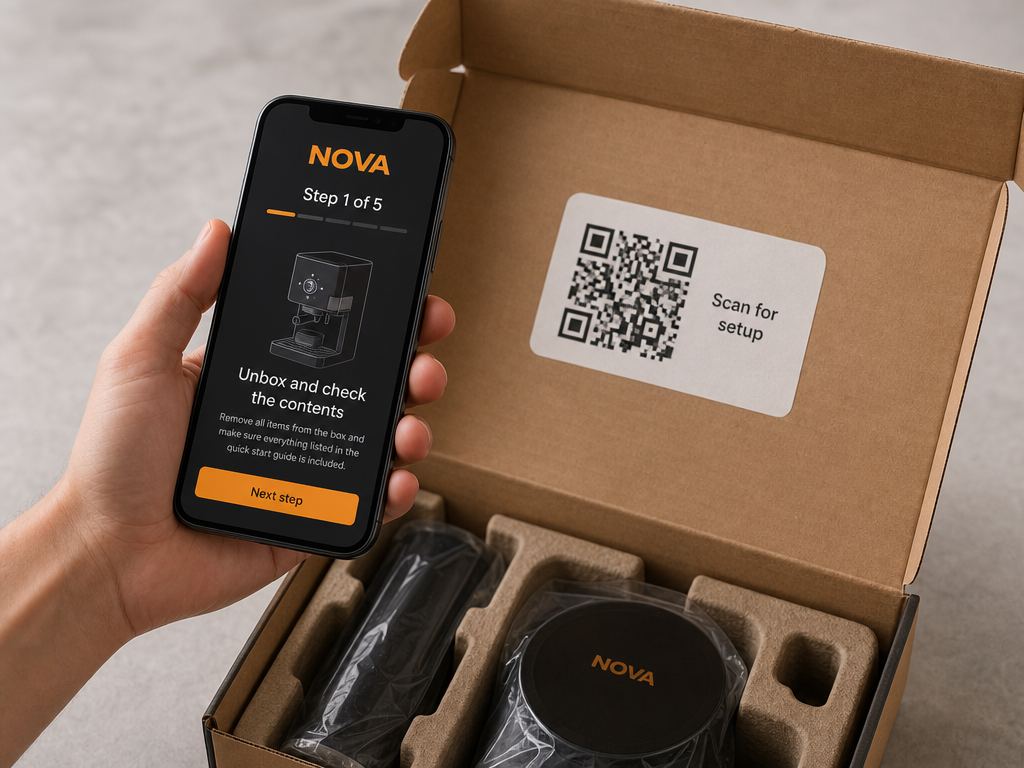
In short: place the code where the question happens, make it roughly 2 cm square with clear margin, use dark-on-light with a matte finish, label it with what the customer gets, print the short URL underneath, point it at a permanent address you control, and test the scan on the real material before the print run.
A QR code on packaging is one of the few design decisions that is simultaneously cheap, permanent and easy to get wrong. These are the practices that survive contact with real phones, real lighting and real print processes.
Placement: the box or the product?
Both, for different jobs. Packaging is read once, at unboxing, when setup questions occur. The product is read for years, when cleaning and troubleshooting questions occur. If you can only print one code, put it on the product.
Inside the lid
The strongest packaging position. It is the first surface someone sees, at the exact moment they need setup help.
On the product or rating plate
Outlives the box. Best for maintenance, consumables and troubleshooting.
On the quick-start card
Lets a one-page card replace a twenty-page booklet.
Outside the box
Useful in retail for pre-purchase questions, but it disappears with the packaging.
Size and quiet zone.
- Start at 2 cm square — A reliable minimum for handheld scanning on packaging.
- Scale with distance — Rough rule: code width of about one tenth of the intended scanning distance. Machinery read from two meters needs a much larger code.
- Protect the quiet zone — Leave clear space of at least four module widths around the code. Crowding it with artwork is the most common cause of failed scans.
- Keep the URL short — Long URLs create denser codes that need to be printed larger to stay readable.
Contrast, color and finish.
- Dark code, light background — Inverted codes are read inconsistently. Do not risk it on a print run.
- Avoid low-contrast brand palettes — A tasteful beige-on-cream code is a code nobody can scan.
- Prefer matte over gloss — High-gloss laminate under a ceiling light produces a specular hotspot straight across the code.
- Mind the substrate — Kraft board, textured plastic and powder-coated metal all reduce edge definition. Test the actual material.
- Keep it flat — Codes on tight curves and folds distort. Place away from creases and seams.
The label matters as much as the code.
People scan when they know what they will get. A code with no explanation is asking for blind trust. Write the benefit, not the mechanism:
- "Scan for setup instructions" — Clear, immediate, matched to the moment of unboxing.
- "Need help? Scan here" — Good for troubleshooting placements on the product itself.
- "Scan to see how to clean it" — Specific tasks convert better than generic invitations.
- Add the short URL — Print it underneath for people who prefer typing, and as a fallback.
- Avoid "Scan me" — It says nothing about what happens next.
What the code should link to.
A mobile page you control that answers the question the label promised. Not your home page, not a PDF, not a marketing campaign that will be retired next quarter, and not an app store listing. If the label says setup, the first thing on screen should be step one.
Never encode a URL you cannot change later. Packaging and products stay in circulation for years. Encode a permanent address on a domain you own, and edit the content behind it - see [how to create a QR code instruction manual](/blog/qr-code-instruction-manual) and [updating instructions after shipping](/blog/update-product-instructions-after-shipping).
Print production notes.
- Supply vector art — An SVG or EPS scales without softening the module edges. Never upscale a small PNG.
- Use pure black — Rich black builds can misregister and blur the pattern. Single-channel black is safer.
- Watch small-format processes — Flexo and direct-to-substrate printing spread ink; increase size slightly for those.
- Check die lines — Confirm the code is not near a fold, glue flap, tear strip or window.
Test before you commit.
- Print a physical proof — On the real material, with the real finish. Screen tests prove nothing.
- Multiple phones — Include an older handset and both major camera apps.
- Bad conditions — Dim room, harsh downlight, arm's length, slight angle, one-handed.
- A first-time user — Hand it to someone who has never seen the product and watch where they hesitate.
- Check the landing page on 4G — A slow, heavy page undoes a perfect scan.
Common mistakes.
- Only on the outer box — The code is recycled before most questions arrive.
- No explanatory text — Scan rates drop when nobody knows what the code offers.
- Linking to the home page — The customer now has to navigate a site to find step one.
- Linking to a PDF — Pinch, zoom, and a document that can never be corrected once downloaded.
- Requiring an app or account — A login wall in front of setup instructions creates tickets.
- Third-party short links — Someone else's domain, someone else's uptime, and possibly a paywall on your scan data.
How big should a QR code be on packaging?
About 2 cm square is a safe minimum for handheld scanning, with clear margin all around. Scale up as the scanning distance increases.
Can I put my logo in the middle of the code?
Small central logos usually still scan thanks to error correction, but it reduces tolerance. If you do it, prove it with printed samples on the real material.
Should the code be on the box or the product?
On the product if you can only choose one. The box is discarded; the product keeps generating questions for years.
Do colored QR codes work?
Dark ink on a light background is reliable. Low-contrast and inverted combinations are where scans start failing.
How do I track scans?
Point the code at a page you own and read its analytics. That also keeps the scan data yours.
Get a print-ready code and a page worth scanning
Publish mobile instructions to your own address and download the QR code as PNG or vector SVG.
Start free